
Quarterly Updates F&A
By F&A | August 04, 2026

Business Affairs
Business Affairs Year End Deadlines
Review the FY 2026 fiscal year-end closing deadlines and processes for a consolidated overview of key dates and requirements.
The Business Affairs Calendar also provides all of the important dates, reminders, and deadlines for all departments within Business Affairs. The calendar is up-to-date with all the deadlines and processes you need for completing the annual fiscal close process for FY 2026.
For questions, contact Finance Systems Management at fsm@ttuhsc.edu.
Budget
UPCOMING PROCESSES
FY2027 Budget to be Approved.
-
-
- August 13th - 14th Board of Regents meeting
- August 14th - Load operating ledger and create 9/1/26 employee job records
-
BUDGET REVISIONS
- Revisions submitted before 9/1/2026 will populate with FY26 fiscal year.
- Revisions submitted on or after 9/1/2026 will populate with FY27 fiscal year.
- The fiscal year may be changed, contact the Budget Office for assistance.
- Multi-year revisions for FY27 should be submitted after 9/11/2026.
IMPORTANT DATES
- August 13th - 14th - No ePAFs applied in Banner
- August 21st - Release FY26 payroll encumbrances. This process creates available budget in 6001 and 6002 but funds may not be re-budgeted. Funds are for upcoming FY26 payrolls.
- August 31st - Labor redistribution deadline. The only exception is SM 17 payroll and departments need to contact Budget Office by 8/31 for instructions. Labor redistributions for FY26 payrolls submitted after this date will be reviewed on a case-by-case basis.
- September 11th - Salaries will encumber for FY27
Helpful Tools
HR-RPT_NBAJOBS_012 - SM Enc Vs Est Expense
Location: The report can be found in the Team Content > Budget > A Guide to Commonly Used Reports > HR-RPT_NBAJOBS_012 - SM Enc vs Est Expense.

Do I have enough funds in unallocated salaries for semi-monthly payrolls for the remainder of the fiscal year?
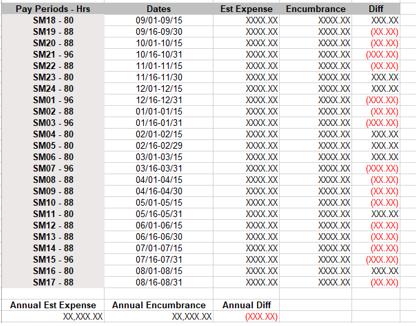

Purpose: Run this report by FOPs that have SM payrolls to determine if you need additional
funding in 6006 unallocated salaries due to semi-monthly fluctuation in payrolls.
Banner encumbers 86.67 hours for each 1.0 FTE SM employee, but each payroll has more
or less hours. The additional hours needed will pull from 6006 when the payroll runs.
This report shows the difference in encumbered pay (86.67 x FTE on FOP x hourly rate)
vs. estimated pay (Actual hours in Pay Period x FTE on FOP x Hourly Rate) in the pay
period for non-exempt employees. The report will be accurate from the date you run
the report unless the employee has a future change of funding record in Banner. This
report does not include any overtime calculation. The estimated expense is based off
of the assumption that all hours in a pay period have been submitted. If an employee
submits less hours than their FTE x Hours Per Pay, the estimate will be incorrect.
These are estimates on the fluctuation in SM hours each pay period. This report renders
in Excel format.
Submit a budget revision to move funding to 6006 if the FOP will be short at the end of the fiscal year. Not sure how many payrolls are left in the fiscal year? The report includes which SM payroll is scheduled to run next and the SM fluctuation estimate from now until the end of the FY. If the fund is a grant, the grant end date is included for manual calculation.
FI-RPT_BAVL_019 - ESTIMATED LONGEVITY
Location: The report can be found in the Team Content > Budget > A Guide to Commonly Used Reports > FI-RPT_BAVL_019 - Estimated Longevity.
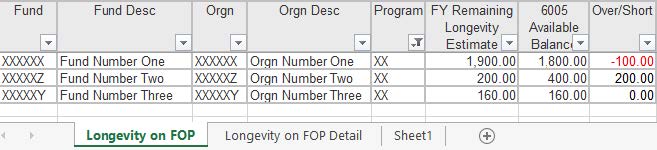
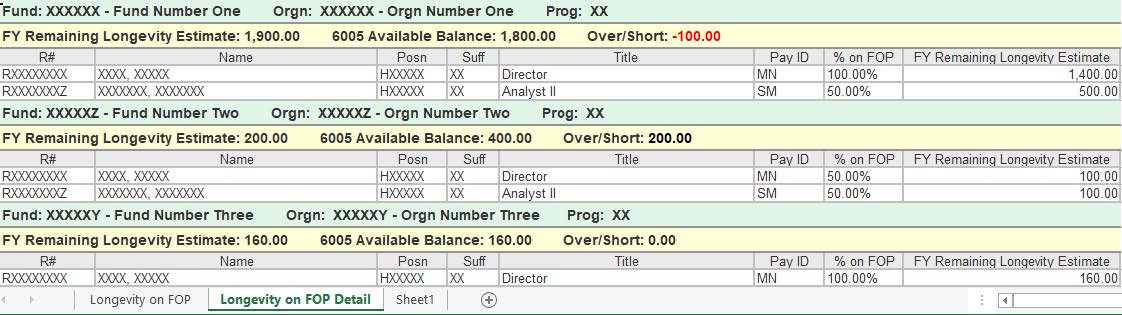
Do I have enough funds in longevity for the remainder of the fiscal year?
Purpose:
- Tab 1 Longevity on FOP - This report will show the estimated longevity needed through the end of the fiscal year on the FOP and an over/short amount based on the 6005 budget availability. This estimate includes increases due to anniversary date.
- Tab 2 Longevity on FOP Detail - This report will give the estimated longevity for each employee on the FOP through the end of the fiscal year along with estimated longevity needed through the end of the fiscal year on the FOP and an over/short amount based on the 6005 budget availability. This estimate includes increases due to anniversary date.
- Data renders based on job labor orgn and security is based on HR orgn security.
- *Report takes up to 20 minutes to run, so it is best to email it to yourself.
RPT_JOBS_004 - LONGEVITY DETAIL
Location: The report can be found in the Team Content > Human Resources > Departmental Users > Employee Appointment Reports > RPT_JOBS_004 - Longevity Detail
Where do I go to see estimated annual longevity for a specific employee?

Purpose: This report shows the estimated annual longevity for an employee and the estimated monthly longevity expense. This estimate includes increases due to anniversary date. Data renders based on home orgn and security is based on HR orgn security.
HR-RPT_NBAJOBS_012 - SM Enc Vs Est Expense
Location: The report can be found in the Team Content > Human Resources > Departmental Users > Employee Appointment Reports > RPT_NBAJOBS_015 - Overloads Report.
Are there overload appointments that I need to reinstate effective 9/1/2026 for FY27?
Purpose: Overload appointments are manually ended by HR 8/31. An ePAF is needed to reinstate overload jobs effective 9/1. Run this report prior to 8/31 to determine if overloads need to be reinstated. Submit an ePAF after 9/1 and before payroll runs.
RESOURCES:
Business Affairs - http://www.fiscal.ttuhsc.edu/fsm/news_home.aspx
Payroll - http://www.depts.ttu.edu/payroll/newsletters/index.php
Pcard - http://www.fiscal.ttuhsc.edu/paymentservices/pcard/
HSC Finance & Admin User Group
- Receives the quarterly F&A update newsletter
- Receives other important info from the institutional Finance & Administration areas of TTUHSC
Recent Articles